Responsive Ads Here
Showing posts with label New Features. Show all posts

Saturday, August 22, 2015

Installing and Configuring SharePoint 2013 and SharePoint Farm

In one of the project I got a chance to set-up a SharePoint 2013 farm configuration for development environment (Hyper V) with below configuration.

  • Windows server 2012 R2
  • SQL Server 2014 

I never worked on configuration part, started typing in google Installing and configuring SharePoint 2013 and farm finally found some articles which will helped me lot to complete the 100% of task. Sad thing is I did not get a chance to document the same.


I found a nice article which contains complete step by step about preparing, installing, configuring the SharePoint 2013 farm with nice explanation.  This PDF has not contains the same configuration what I have mentioned above, its SharePoint 2013 configuration with windows server 2008 in VM ware environment. 

Please click here to download the same. 

Hope this post will be helpful.


Thursday, May 28, 2015

Get a one year free Office 365 developer account


Are you interested in Office 365 Developer Program? Do you want to get FREE!!! developer account? Microsoft gave us possibility to be a part of the Office 365 Developer Program for one year FREE subscription

The Office 365 Developer Program is a vibrant and growing community of developers, veteran and newbie, who are developing solutions on Office 365. I can confirm that Office 365 is still grooving and most of my projects right now are related to this platform.

 So if you interested in the program go this LINK and register. If you’d prefer to take some free, online training courses first, you have a chance at http://dev.office.com/training . Its’ very good move from Microsoft :).

So many videos have placed on APP Development, Boot Strap CSS and AngularJS. 

I hope this post will be helpful to you.....


Sunday, December 7, 2014

Enforce Drag and Drop documents to apply metadata

A useful new feature in SharePoint 2013 is the ability to drag and drop files in to document libraries using browser. This feature is particularly useful for adding multiple documents to the library, to achieve the same functionality in previous versions of SharePoint we need to open the document library in explorer view but explorer view is not a best practice. So drag and drop feature is very useful. Find the below screen shots for the same.


To have the drag and drop feature to SharePoint 2013, here are the scenario or requirements of web browsers.
  • Internet Explorer 10
  • Internet Explorer 9 with Office 2013 Installed
  • Internet Explorer 8 with Office 2013 Installed
  • Firefox latest version
  • Chrome latest version
When we are drag and drop documents in to document library it will not prompt for the metadata which is required. but the document which is uploaded in library will be checked out. In my recent project i have a requirement it should prompt for metadata for single or multiple documents.

I have found a nice article which has full filled my requirement. Please go through the below URL which will give complete idea.

http://sharepoint.findincity.net/view/635399286724222582138466/enforce-drag-and-drop-documents-to-apply-metadata


Tuesday, November 11, 2014

Code Samples – SharePoint 2013 .Net Client Side Object Model

In SharePoint 2013, all the people are using CSOM only. I found a nice PDF which contains all the basic operations.
SharePoint Developers who have some basic knowledge about SharePoint 2010 or 2013 will find this book helpful for understanding and working with the .Net Client Side Object Model. This book is mainly focused on beginner functionality and code samples to perform basic operations using the .Net Client Side Object Model.
We can download the PDF by clicking here.

Download File For Code Samples

Thursday, November 6, 2014

Tools for your SharePoint 2013 development toolbox

In SharePoint 2013, we have so many tools are available to make developer life easily. I have heard some the tool names and some of tool names from colleagues.

Recently i have used SharePoint manager and SharePoint 2013 Search tool which made my life easier. I want to list down all the tools available and how it useful in our daily life. But i did not get a chance to work on that.

Today i found out one post which has all the details about the tools for SharePoint 2013 and documentation also.

Please go through the below link for complete details. I am sure definitely these tools will made our life easier.

http://zimmergren.net/technical/tools-for-your-sharepoint-2013-development-toolbox

I hope this post will be useful..

Monday, November 3, 2014

How to publish provider hosted app in SharePoint online


In SharePoint 2013, Microsoft has introduced apps. we have three types of methodologies to host the apps in SharePoint.

SharePoint hosted app:

This type of App lives inside SharePoint. There is not code running on the server. All code must run in the client. This will have .aspx page but lots of JavaScript code that will implement the logic via client side script and service calls.

Provider-hosted apps comes under cloud hosted app. These apps hosted outside of SharePoint server. Since its hosted outside of SharePoint server you have the freedom to develop an app using any language like PHP, Java or .Net. You can write server side code here which will communicate with SharePoint server. Here it will use OAuth protocol for authentication mechanism.

Provided hosted app enables developer to define its own infrastructure which may be a dedicated server or may be a cloud server provided by providers like Amazon.
As we know provider hosted app we can deploy both in on premises and SharePoint online. Let us discuss how to deploy the app in SharePoint online. in my next post we will discuss how to host the app in on premises.

When we are creating provider hosted app in VS, it will create two projects app and appweb. Before starting creation of provider hosted app we need to have SharePoint Online and Windows azure account.

In my SharePoint online site, I have created one site collection with developer site template.

1.       Create a new project in VS with the template App for SharePoint, give the name of the project and click on OK. In this screenshot I am creating a project with the name SampleProviderhostedapp.

App For SharePoint

2. Click on OK it will prompt for the site name where you want to debug the provider hosted app. I have given my SharePoint online developer site name and selected the provider hosted app in the section how do you want the host the app.


3.     3. Click on next we will get the window which will ask which type of project you want to create. We can create the project in Asp.Net Web forms application or ASP.Net MVC application. I am going with the option ASP.Net Web forms application.

Web Project Selection

3.     4.Click on Next we will get a window to where we can configure the authentication settings, I am going with the option with windows Azure Control service and click on Finish.

Authentication Settings

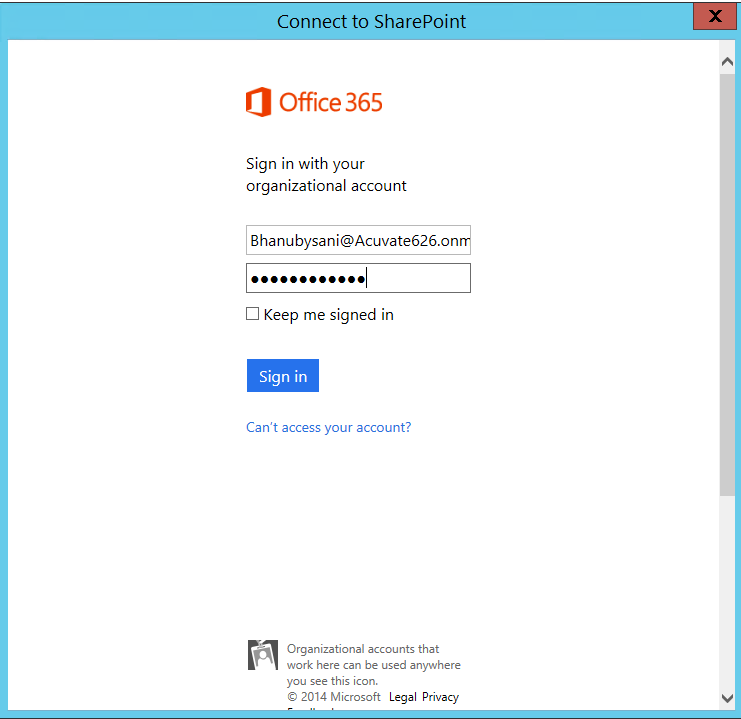
3.     Click on finish, a project will be created and it will prompt for the SharePoint Online Credentials to connect with SharePoint Online.

Online Credentials


3.     Enter the credentials and click on Sign in button, we will find the project will be created with 2 solutions one is App and another one is APPWeb. See the below screen shot.
Solution view

   App Project will contain only app manifest XML which will be useful for configuration the app like default page and version of the app.


Right Click on App web project and click on Publish it will open the window to select the publish target. 
Publish Web

3.     I want to publish to the APPWeb in windows Azure, so we need to create a site in windows azure account. I have created with the site name as Bhanu test.

Azure site

3.     We need to download the publish profile in windows azure to publish the appweb to Windows azure. For this click on the site BhanuTest (site name) where I want to publish. Once click on the site you will navigate to the below page.

Azure Site Creation

Click on the Download the Publish Profile which is in the Publish your app section. Once click on the link a file will be downloaded.


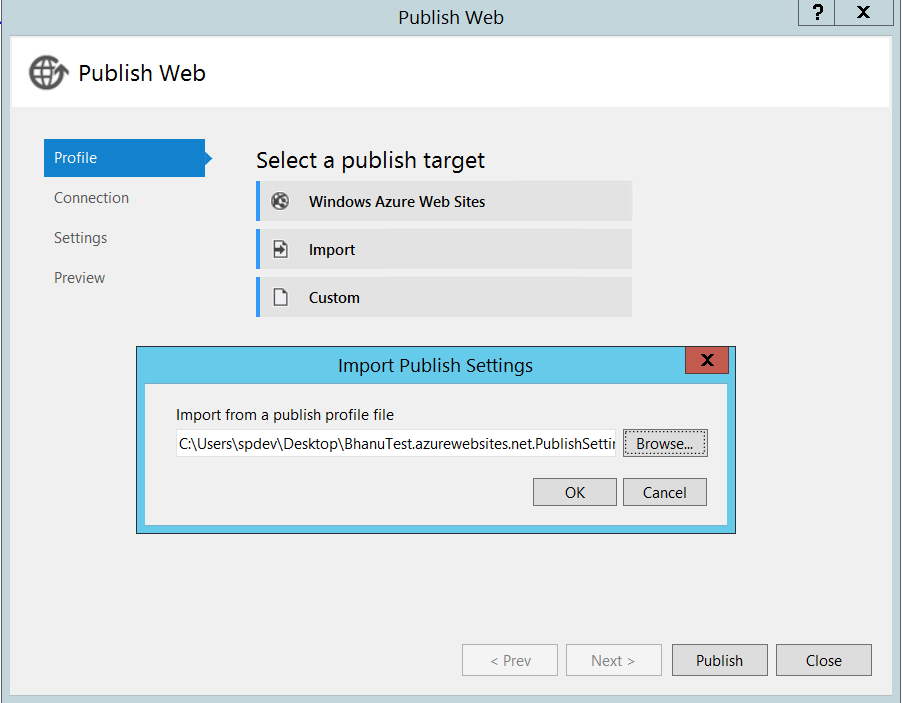
Now go to the VS in Publish Target window click on Import it will prompt the window, where we can browse the profile which we have downloaded from Windows Azure site.

Publishing Web

Click on Ok. It will navigate you to the connection tab.

Publish web-1

Click on Validate Connection it will validated the connection, Once validation completes you will get the green symbol beside the validate connection button.


Publish Web1

Click on Next It will navigate you to the Settings tab where we can select the configuration. I am selecting the debug in the dropdown. 

Debug Mode

Click On next and Click on Start Preview it will show the files and click on publish.


Preview Selection

After Publishing it will navigate to the success page like below screen shot.


Site Creation
 
Now go to VS solution explorer you will find out the Publish Profiles folder which will contains the profile which we have downloaded from the Azure Site.

Solution Property

Now go to the Developer site and browse the appregnew.aspx page which will be available in the page layouts.


In this page we can create client id and client secret id. These id we can use in our APPweb and APP solutions. Client Id is bridge between the two solutions.


So browse the page and fill the information and click on create button.

App Reg page
Generate the Client Id, Client Secret Id. Give the Title for the app whatever you want.


App Domain and Redirect URI we need to give the windows azure site name. Redirect URI will allow only the https. Once fill the information click on create button app identifier will be created and you will be navigated to the below page.


App Identifier
 Now go to the Web.config file which is in the APPweb solution. Update the Client Id and Client secret id and publish the solution.

App Manifest

   Right Click on the APP solution and click on publish you will navigate to the      below page.

App Publishing
 
 Click on Deploy your web Project. It will prompt a window like below.

App Publishing -1

App Package

 Click on Publish. After that you need to package the app to upload the app in to site for click on the Package the APP which will be available in the publish your app page.


When you click on the Package the app, it will prompt the window like below.

Packaging App

 We need to enter the Client Id and update the site URL. Normally it will show    the URL without https so we need to update with https and click on Finish.
Now it will open the window which will contain the app file.  Now browse your SharePoint Developer site and upload this app in to apps testing.

Apps in testing

  Click On new app to deploy, It will open the below window.

Upload app selection

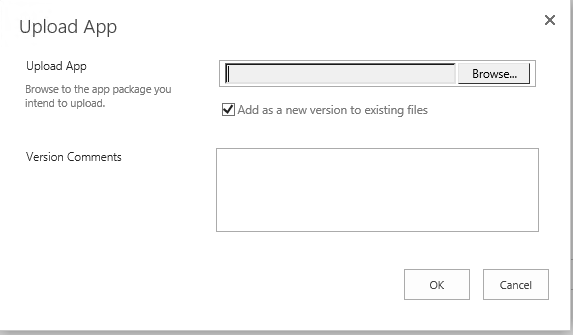
    Click on Upload hyperlink, once click on that it will open another window where    we can browse your app file.


Upload app selection-1


  Click on browse button and browse your app project, navigate to binà Debug     Ã  app.publish à go to version folder à select the app file and click on Ok.


Deploy App

It will show the above window which will be stated as your app has been     successfully uploaded. It’s time to deploy your App. Click on Deploy button. It will open the below wind and click on trust it.

Trusting App

Click on trust it button app will be installed. Now you can browse the app by accessing the site contents. 


Saturday, October 18, 2014

SharePoint 2013 Search Query Tool

Our days made very easy with the tools and components in our daily life. In SharePoint also so many tools came to made developer life easy. Recently i saw a very good and useful tool in SharePoint which  made my life easy.
SharePoint 2013 came up with very good features and improvements. I Want to concentrate more related about search. Continuous crawling, no more fast search integrated as default etc.
Recently i had an requirement to edit the display template and need to add some out of box managed properties and custom properties. I faced lot of troubles to find out what is best suitable property for my requirement. Every time i am guessing the properties and running the full crawl again.
Then i found out very good tool which will give a chance to build a query and running the query, you can view all types of result sets returned, Primary results, Refinement results, Query rule results, Query suggestions and raw response received from the search service. 
It will work with both SharePoint online and on premises.

Please find the complete documentation, download and how to use the tool by accessing the below mentioned URLs.

Friday, October 17, 2014

Simple Way to check Responsive UI of the Website across different browsers

Now a days responsive UI is a term we are listening in our daily life. Responsive Design which leads to design the website or app in such a way that the same design can be rendered across various different size of devices screen sizes providing the rich user experience.
For this we will use bootstrap css to get the responsiveness to website or app. I came across a scenario how to test the same web site or app in different browsers. As a dev we can't check all the devices with different browsers testing will become a headache for simple change.
The below link will solve the problems.  we need to type the website address where the website or app has been hosted, when we click on Go button the site will be rendered in different devices and browsers. This will solve our problems in very easy way.

http://www.responsinator.com/
  
Responsive Web Design is a concept which leads to design a website or app in such a way that the same design can be rendered across various devices of different screen sizes and orientations providing the users with the best possible user experience, if not similar. - See more at: http://www.w3resource.com/responsive-web-design/overview.php#sthash.nzpAWVu7.dpuf

Thursday, October 16, 2014

How to handle the threshold limit when working with large lists

Let us see how to work with large lists. we know that SharePoint list threshold limit is 5000. This means when we are querying against list, list threshold limits to access maximum 5000 items through view/Query. But the list can hold  as much as 30,000,000 items but we can't access more than 5000 items at once by view or query. 
But i got a scenario to display all the items based upon the condition, even the query or view returns more than 5000 items.

To handle this scenario i goggled finally i got the pros and cons of different solutions and why this limitation is present.
SharePoint Provides an API to access large lists using ContentIterator

Please find the below links for more information.
http://ranaictiu-technicalblog.blogspot.in/2014/06/sharepoint-access-large-list.html


Tuesday, October 22, 2013

Chris O'Brien: SPDataSource - every developer's friend (part 2)

Saturday, May 4, 2013

SharePoint 2010 vs. SharePoint 2013 Boundaries and Limits Comparison

Great post on Boundaries and Limits comparison between SharePoint 2013 and SharePoint 2010 versions. This should help to understand the improvements/additions better. A good helpful post for Architects and Developers. Check This URL

Wednesday, September 5, 2012

Visual Studio 2012 Features – SQL Server Object Explorer


Visual Studio 2012 introduced a new feature called SQL Server Object Explorer. In earlier versions of Visual Studio, we have Server Explorer, which opens up a particular connection and work with a single database data. Now with the new SQL Server Object Explorer, we are able to manipulate multiple databases from a database server.

For more details please refer the below links
http://www.dotnetfunda.com/articles/article1961-visual-studio-2012-features-sql-server-object-explorer.aspx

http://ambilykk.wordpress.com/

Visual Studio 2012 Features – Extract To User Control


Visual Studio 2012 introduces another great feature for creating a user control out of the existing code. Till now we used to create different User controls and use it in main page. Now, with the introduction of Visual Studio 2012, we are developing the pages and generate the User controls from the existing page design.

For more details please follow the below mentioned posts.

http://www.dotnetfunda.com/articles/article1963-visual-studio-2012-features-extract-to-user-control.aspx